Install OpenWrt on a single-NIC Proxmox VE host
Outcome
Section titled “Outcome”You can choose the right topology on a PVE host with one physical NIC:
- without changing the PVE management address;
- without accidentally serving DHCP on
vmbr0; - with a bypass resolver or an internal LAN lab;
- and with host access that survives the router VM being stopped.
Applicable environment
Section titled “Applicable environment”- Proxmox VE 8.x/9.x with one physical NIC;
vmbr0carries both the PVE management address and the upstream gateway. - This page is written for PVE 9.2.2, one Realtek RTL8111 NIC,
vmbr0 192.168.50.2/24, gateway192.168.50.1. - One NIC cannot physically separate WAN and LAN. Do not copy the
enp1s0/enp2s0layout from dual-NIC guides. Use a bypass service or an internal PVE bridge. - A second NIC or a VLAN-capable switch is easier; that topology is out of scope here.
Two topologies
Section titled “Two topologies”A. Bypass DNS/gateway (smallest change)
Section titled “A. Bypass DNS/gateway (smallest change)”OpenWrt has one vNIC on vmbr0 with LAN address 192.168.50.3/24, and DHCP is disabled. Clients use it as DNS (or gateway) manually; it reaches the internet through 192.168.50.1.
| Physical port | PVE bridge | Virtual NIC | OpenWrt interface | Role |
|---|---|---|---|---|
| nic0 | vmbr0 | net0 | lan 192.168.50.3 | bypass DNS/gateway |
Good for validating DNS, AdGuard Home, or OpenClash DNS/rules without touching the main router’s DHCP.
B. Internal PVE LAN lab (recommended for routing tests)
Section titled “B. Internal PVE LAN lab (recommended for routing tests)”OpenWrt has two vNICs: net0 on vmbr0 as WAN (DHCP), net1 on vmbr1 as LAN (192.168.1.1/24). vmbr1 has no physical ports and is only used by a test client VM.
| Physical port | PVE bridge | Virtual NIC | OpenWrt interface | Role |
|---|---|---|---|---|
| nic0 | vmbr0 | net0 | wan DHCP | upstream 192.168.50.1 |
| — | vmbr1 | net1 | lan 192.168.1.1 | internal test client |
This validates routing, NAT, DHCP, DNS, and “host still reachable after the router VM stops” without touching the physical LAN.
Before you change anything
Section titled “Before you change anything”ip -br linkip -br addrcat /etc/network/interfacesbridge linkqm listpvesm statusWrite down the vmbr0 address, gateway, physical port, and VM list. On a single-NIC host, vmbr0 is your only management path; a mistake can lock you out.
ExpectedYou can restore vmbr0 from notes if something breaks.
Use a monitor/keyboard, IPMI, or cloud VNC; do not rely on SSH alone. Then download the OpenWrt x86_64 image on the PVE host:
cd /var/lib/vz/template/isowget https://downloads.openwrt.org/releases/25.12.6/targets/x86/64/openwrt-25.12.6-x86-64-generic-ext4-combined.img.gzwget https://downloads.openwrt.org/releases/25.12.6/targets/x86/64/sha256sumssha256sum -c sha256sums --ignore-missinggzip -d openwrt-25.12.6-x86-64-generic-ext4-combined.img.gzDo not continue if the checksum fails. Use the current filename/version from downloads.openwrt.org.
ExpectedYou can still reach PVE if SSH dies.
Minimal steps
Section titled “Minimal steps”Start with a temporary bridge; persist it only after it works:
ip link add name vmbr1 type bridgeip link set vmbr1 upip -br link show vmbr1ip -br addr show vmbr0vmbr1 has no physical port, so it cannot leak DHCP to the home LAN. Do not run a DHCP server on vmbr0.
Expectedvmbr1 exists and is up; vmbr0 addresses are unchanged.
qm create 200 --name openwrt-lab --memory 512 --cores 2 --ostype l26 \ --scsihw virtio-scsi-pci \ --net0 virtio,bridge=vmbr0 \ --net1 virtio,bridge=vmbr1 \ --serial0 socketqm importdisk 200 /var/lib/vz/template/iso/openwrt-25.12.6-x86-64-generic-ext4-combined.img local-lvmqm set 200 --scsi0 local-lvm:vm-200-disk-0qm set 200 --boot order=scsi0qm start 200Use pvesm status for the real storage ID. After qm importdisk, confirm the disk name from the command output; it may be vm-200-disk-0.
ExpectedVM 200 has a scsi0 boot disk and net0/net1.
qm terminal 200If serial has no output, use the PVE VNC console. Inside OpenWrt:
ip link showip addr showuci show networkThe eth0/eth1 order is not guaranteed to match net0/net1; verify by MAC/link and uci show network. Do not assume eth0 is WAN. In this lab, net0=eth0=WAN and net1=eth1=LAN, but re-check on another host.
ExpectedYou know which interface is WAN and which is LAN.
In the OpenWrt console, replace eth0/eth1 with the interfaces you verified:
uci set network.wan=interfaceuci set network.wan.proto='dhcp'uci set network.wan.device='eth0'uci set network.lan=interfaceuci set network.lan.proto='static'uci set network.lan.device='eth1'uci set network.lan.ipaddr='192.168.1.1'uci set network.lan.netmask='255.255.255.0'uci set dhcp.wan=dhcpuci set dhcp.wan.interface='wan'uci set dhcp.wan.ignore='1'uci commit networkuci commit dhcp/etc/init.d/network reloadConfirm dhcp.wan.ignore='1'; otherwise OpenWrt may serve DHCP on the upstream vmbr0 and disturb the home network.
ExpectedWAN gets an address from 192.168.50.1; LAN is 192.168.1.1; no DHCP on vmbr0.
Create a test VM on vmbr1 (or attach its NIC there) and let it get a lease from OpenWrt LAN. Then:
ip routeping 192.168.1.1ping 192.168.50.1nslookup openwrt.orgIf the client gets no lease, inspect OpenWrt dhcp.lan and dnsmasq before changing vmbr0.
ExpectedThe client reaches 192.168.1.1, the upstream gateway, and DNS.
Verification
Section titled “Verification”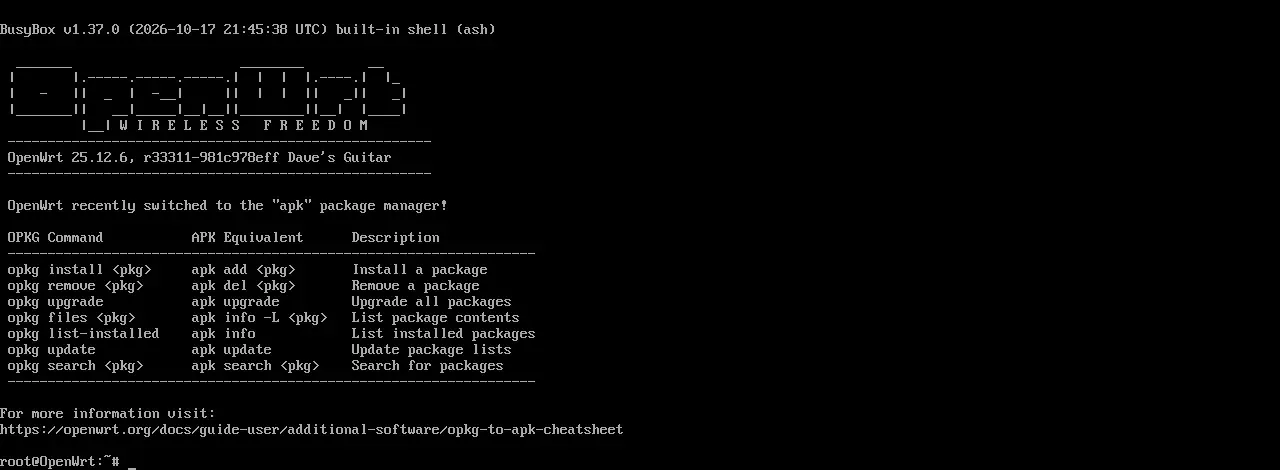
qm status 200is running;qm config 200showsnet0onvmbr0,net1onvmbr1.- Inside OpenWrt,
ip addr showshows WAN192.168.50.xand LAN192.168.1.1/24. - Test client: default gateway is
192.168.1.1, can ping192.168.50.1, and resolvesopenwrt.org. - Host:
ssh [email protected]and the PVE web UI still work. - Stop the router VM (
qm stop 200); host management still works;qm start 200restores it.
Failure branches and recovery
Section titled “Failure branches and recovery”Host SSH is unreachable
Section titled “Host SSH is unreachable”Stop changing the network. Use the monitor/keyboard, IPMI, or cloud console and check:
ip -br addr show vmbr0cat /etc/network/interfacesbridge linkIf you just edited /etc/network/interfaces, restore the backup and reload:
cp /etc/network/interfaces.bak.YYYY-MM-DD /etc/network/interfacesifreload -aIf only the temporary vmbr1 caused the problem, first confirm no other VM uses it:
grep -R "vmbr1" /etc/pve/qemu-serverOnly delete it when that command prints nothing:
ip link set vmbr1 downip link del vmbr1OpenWrt has no WAN address
Section titled “OpenWrt has no WAN address”qm config 200qm terminal 200Inside OpenWrt, check ip link show, uci show network, and logread. Confirm net0 is on vmbr0 and nic0 is up; do not add a second DHCP server on vmbr0.
Test client gets no 192.168.1.x lease
Section titled “Test client gets no 192.168.1.x lease”Check OpenWrt dhcp.lan and whether dnsmasq is running; confirm the test VM is actually attached to vmbr1. Do not change vmbr0 addresses or gateway to “fix” the lab.
Can you still reach the host after stopping the router VM?
Section titled “Can you still reach the host after stopping the router VM?”That is the recovery gate: after qm stop 200, open https://192.168.50.2:8006 and SSH from another machine. If not, your management path depends on OpenWrt; fix that before continuing.
E2 lab run (2026-10-20)
Section titled “E2 lab run (2026-10-20)”- Environment: PVE 9.2.2, one Realtek RTL8111,
vmbr0 192.168.50.2/24; OpenWrt 25.12.6 x86_64 VM 200, 512MB/2 vCPU. - OpenWrt WAN
eth0received192.168.50.77by DHCP from192.168.50.1; LANeth1is192.168.1.1/24. - A netns client on the internal
vmbr1received192.168.1.191by DHCP, used192.168.1.1as its default route, resolvedopenwrt.org, and got HTTP 200. - After
qm stop 200, a fresh SSH connection to the PVE host still worked;vmbr0remained192.168.50.2/24. - Not tested: physical LAN clients, dual-NIC layout, long-run stability, PPPoE/IPv6 upstream. These are outside this E2 result.
Sources and review
Section titled “Sources and review”- This page is an E2 lab run, not a pure E1 draft; it has not been independently reviewed or tested on a physical LAN.
- Recipe:
tests/recipes/pve-single-nic-25.12.md. It records the image SHA-256,qm config 200, and client results. - Single NIC is not dual NIC: do not turn this into a “physically separate WAN/LAN” guide without a second NIC or VLAN switch.
Sources
Independent OpenWrt notes. Every page states the firmware, device, package manager and way back.
Icons: Solar by 480 Design, CC BY 4.0